
[VB-05] Tận dụng “Commands & Hooks” để tăng hiệu suất!
Đây có lẽ là những tính năng bị "underrated" nhất trong Claude Code, cơ bản là vì mọi người thường không có ý tưởng nào để sử dụng chúng, cùng tham khảo những ý tưởng của mình nhé.

Commands là gì?
Là cách gửi nhanh những mẫu prompt tạo sẵn của bạn.
Khác với CLAUDE.md hay agents/<name>.md vốn là “System Prompt”, thì commands là “User Prompt”, nó có “sức nặng” hơn nhiều và sẽ được ưu tiên xử lý hơn.
Ví dụ như trong quá trình làm việc có những mẫu prompt mà bạn cứ phải viết đi viết lại nhiều lần, thì giờ bạn có thể đóng gói nó vào một command và gọi ra với /<command-name> một cách nhanh chóng.
Cách tạo Commands
Rất đơn giản, tạo file Markdown trong `~/.claude/commands` với cấu trúc như sau:
---
description: Mô tả command này
---

Viết prompt của bạn ở đây

$ARGUMENTS
Bạn có thể sử dụng command này ở tất cả những dự án với /<command-name>
Nếu bạn muốn tạo command cho mỗi dự án đang làm thôi thì cứ tạo trong
`./.claude/commands`là được.(*)
$ARGUMENTSchính là giá trị theo sau command được chèn vào vị trí được đặt để (VD:/fixLỗi ngôn ngữ mặc định)
—
Pro Tip:
Trong bài “Subagents” đầu tiên mình có đề cập đến việc "Commands" là cách tốt nhất để summon Subagents khi cần thiết, vì vậy chúng ta có thể tạo những workflow chi tiết rõ ràng trong mỗi command để tuỳ biến theo ý mình, phù hợp với từng đặc thù nhiệm vụ khác nhau.
Ví dụ: fix-ci.md
---
description: Đọc, phân tích, debug và sửa failed tests của Github Actions
---

Đọc, phân tích, debug và sửa failed tests của Github Actions:

$ARGUMENTS

Quy trình:
- Sử dụng "debugger" agent để đọc và phân tích logs của Github Actions
- Sử dụng "planner" agent để lên kế hoạch thực hiện các bản sửa lỗi
- Sử dụng "tester" agent để kiểm thử các bản sửa lỗi, đảm bảo các test suite đều vượt qua
—
Bài này thì mình hơi lười, mà cũng không còn gì nhiều để nói về “Commands”, nên xin phép chỉ share danh sách những command mình tạo để dùng trong Claude Code.
Mình cũng để toàn bộ command files trong repo này, cùng với toàn bộ setup Subagents mà mình đã optimized và đang sử dụng, anh em nào cần thì cứ xỉa về dùng thoải mái.
(Nếu có feedback hoặc ý tưởng improve gì thì cứ contribute trực tiếp vào repo luôn nha!)
Thật ra mình cũng “được inspired” (cách nói fancy của “đi xỉa”) từ repo của người khác mà thôi, một trong những repo mà mình thấy khá hữu ích cho những ai dùng Claude Code đó là: https://github.com/mrgoonie/claude-code-setup - mọi người check thử nghen!
Danh sách commands mà mình dùng:
/ask
Dùng command này để hỏi mọi thứ về codebase
---
description: Answer technical and architectural questions.
---
## Context
- Technical question or architecture challenge: $ARGUMENTS
- Relevant system documentation and design artifacts will be referenced using @ file syntax.
- Current system constraints, scale requirements, and business context will be considered.

## Your Role
You are a Senior Systems Architect providing expert consultation and architectural guidance. You focus on high-level design, strategic decisions, and architectural patterns rather than implementation details. You orchestrate four specialized architectural advisors:
1. **Systems Designer** – evaluates system boundaries, interfaces, and component interactions.
2. **Technology Strategist** – recommends technology stacks, frameworks, and architectural patterns.
3. **Scalability Consultant** – assesses performance, reliability, and growth considerations.
4. **Risk Analyst** – identifies potential issues, trade-offs, and mitigation strategies.

## Process
1. **Problem Understanding**: Analyze the technical question and gather architectural context.
2. **Expert Consultation**:
   - Systems Designer: Define system boundaries, data flows, and component relationships
   - Technology Strategist: Evaluate technology choices, patterns, and industry best practices
   - Scalability Consultant: Assess non-functional requirements and scalability implications
   - Risk Analyst: Identify architectural risks, dependencies, and decision trade-offs
3. **Architecture Synthesis**: Combine insights to provide comprehensive architectural guidance.
4. **Strategic Validation**: Ensure recommendations align with business goals and technical constraints.

## Output Format
1. **Architecture Analysis** – comprehensive breakdown of the technical challenge and context.
2. **Design Recommendations** – high-level architectural solutions with rationale and alternatives.
3. **Technology Guidance** – strategic technology choices with pros/cons analysis.
4. **Implementation Strategy** – phased approach and architectural decision framework.
5. **Next Actions** – strategic next steps, proof-of-concepts, and architectural validation points.

## Important
This command focuses on architectural consultation and strategic guidance. Do not start implementing anything.
/cook
Trong system prompt mình đã có 3 phần quan trọng của workflow làm việc với subagents: Core Responsibilities, Subagents Team and Development Rules.
Gọi command này để implement tính năng nào đó, hoặc sửa lỗi nào đó phức tạp, cần nguyên đội ngũ agents tham gia.
---
description: Implement a feature
---
Strictly follow your Core Responsibilities, Subagents Team and Development Rules.
Start implementing this task:
 $ARGUMENTS
/fix
Có những lỗi vặt cần sửa nhanh thì cứ dùng command này thôi cho khỏe.
---
description: Analyze and fix the issue [FAST]
---
Analyze and fix this issue:
<issue>
$ARGUMENTS
</issue>
/fix-test
Chạy test suite ở máy mình (local) để kiểm tra kết quả, nếu có failed tests thì phải làm mọi thứ cho nó pass, lặp lại tới chớt :))
pass, lặp lại tới chớt :))
---
description: Run test flows and fix issues
---
## Reported Issues
 $ARGUMENTS

First use the `debugger` subagent and `tester` subagent to find the root cause of the issues, then analyze the reports and implement the fix. Repeat this process until all issues are addressed.

After finish, delegate to `code-reviewer` agent to review code.
/test
Chạy test suite ở máy mình (local) để kiểm tra kết quả, sau đó báo cáo lại hướng thực thi.
---
description: Debugging technical issues and providing solutions.
---
Use the `tester` subagent to run tests locally and analyze the summary report.
/refactor
Thông thường “refactoring” là một quy trình khá phức tạp và... nguy hiểm. Do đó mình cần nhiều hướng dẫn ràng buộc hơn (mình chỉ mô tả các ý chính, còn lại là dùng Meta Prompt với Claude Desktop để tạo)
---
description: Refactoring technical debt and improving code quality.
---
Refactoring scope/target: $ARGUMENTS

## Context
- Existing test coverage and dependencies will be preserved.

## Your Role
You are the Refactoring Coordinator orchestrating four refactoring specialists:
1. **Structure Analyst** – evaluates current architecture and identifies improvement opportunities.
2. **Code Surgeon** – performs precise code transformations while preserving functionality.
3. **Design Pattern Expert** – applies appropriate patterns for better maintainability.
4. **Quality Validator** – ensures refactoring improves code quality without breaking changes.

## Process
1. **Current State Analysis**: Use `planner-researcher` agent to map existing code structure, dependencies, and technical debt, and provide the comprehensive implementation plan.
2. **Refactoring Strategy**:
   - Structure Analyst: Identify coupling issues, complexity hotspots, and architectural smells
   - Code Surgeon: Plan safe transformation steps with rollback strategies
   - Design Pattern Expert: Recommend patterns that improve extensibility and testability
   - Quality Validator: Establish quality gates and regression prevention measures
   - Risk Management: Identify and mitigate risks associated with refactoring
3. **Incremental Transformation**: Design step-by-step refactoring with validation points.
4. **Quality Assurance**: Use `code-reviewer` agent and `tester` agent to Verify improvements in maintainability, readability, and testability.

## Output Format
1. **Refactoring Assessment** – current issues and improvement opportunities.
2. **Transformation Plan** – step-by-step refactoring strategy with risk mitigation.
3. **Implementation Guide** – concrete code changes with before/after examples.
4. **Validation Strategy** – testing approach to ensure functionality preservation.
5. **Next Actions** – monitoring plan and future refactoring opportunities.

**IMPORTANT:** Ask the user for confirmation on the refactoring plan before start implementation.
/debug
Kích hoạt “debugger” agent để tìm nguyên nhân cốt lõi của vấn đề gì đó, sau đó báo cáo lại (không thực thi nhé, mình phải review cái đã!)
---
description: Debugging technical issues and providing solutions.
---
**Reported Issues**:
 $ARGUMENTS

Use the `debugger` subagent to find the root cause of the issues, then analyze and explain the reports to the user.
**Do not implement the fix automatically.**
/watzup
Trong quá trình vibe coding, mình thấy command này khá hữu ích với bản thân, vì AI viết code không chứ mình có viết đâu, nên hôm sau hoặc 2-3 hôm quay lại là gần như không nhớ nổi mình đã làm gì gần đây, và giờ nên làm gì tiếp.
Command này sẽ giúp xem qua các commit gần nhất, các tài liệu trong `./docs` và tổng hợp lại cho mình biết.
---
description: Review recent changes and wrap up the work
---
Review my current branch and the most recent commits.
Provide a detailed summary of all changes, including what was modified, added, or removed.
Analyze the overall impact and quality of the changes.
Mình nghĩ dùng Commands như thế này cũng share được giữa các thành viên trong team nữa, khá là hữu ích.
—
Hooks - là gì & để làm gì?
Nói đơn giản, hooks giống như những "cài đặt tự động" mà bạn cài trong game vậy. Thay vì hy vọng AI nhớ làm việc gì đó, bạn lập trình sẵn cho nó: "Mỗi khi làm việc X thì phải làm việc Y". Không thương lượng, không "quên", không "có lẽ" - cứ thế mà chạy.
Hay nói cách khác, nếu bạn đã hiểu về cách hoạt động của Webhook, thì Hooks hoạt động tương tự như vậy.
Có 8 loại hooks chính:
UserPromptSubmit - Chạy ngay khi bạn gửi câu hỏi (trước khi Claude xử lý)
PreToolUse - Chạy trước khi Claude dùng tool (có thể block tool)
PostToolUse - Chạy sau khi Claude dùng tool xong
Notification - Chạy khi Claude gửi thông báo
Stop - Chạy khi Claude hoàn thành response
SubagentStop - Chạy khi subagent hoàn thành task
PreCompact - Chạy trước khi compaction
SessionStart - Chạy khi bắt đầu session
Các trường hợp mà mình sử dụng hooks:
Gửi thông báo khi hoàn tất công việc
Cụ thể ở đây mình sẽ sử dụng hook để CC gửi thông báo qua Telegram khi nó implement xong:
1/ Tạo Telegram Bot:
Nhắn /start cho @BotFather
Dùng /newbot để tạo bot mới
Chọn username (phải kết thúc bằng "bot")
2/ Lấy Chat ID:
Nhắn "hello" cho bot vừa tạo
Vào `https://api.telegram.org/bot<YOUR_BOT_TOKEN>/getUpdates`
Copy `chat_id` từ response JSON
3/ Cài environment variables:
export TELEGRAM_BOT_TOKEN="123456789:ABCdefGHIjklMNOpqrsTUVwxyz"export TELEGRAM_CHAT_ID="987654321"4/ Cài hook: Sau khi cài đặt, Hook sẽ tự động hoạt động! Không cần lệnh bổ sung.
Bây giờ thì mỗi khi CC hoàn thành việc, nó sẽ gửi tin nhắn summary tới Telegram của mình để thông báo, chỉ việc quay lại để review nữa thôi.
TTS + Hook = Voice Assistant!
Đây là một case study khá thú vị khác, biến Claude Code thành một trợ lý biết nói 😁
Cách làm cũng đơn giản thôi
Trước tiên thì máy bạn cần hỗ trợ Python (nếu chưa có thì cài trước nghen)
1/ Setup hook:
Mở `~/.claude/settings.json` (hoặc `./.claude/settings.json` nếu bạn chỉ muốn cấu hình cho riêng 1 dự án)
Thêm đoạn này vào:
{
  "$schema": "https://json.schemastore.org/claude-code-settings.json",
  "hooks": {
    "Notification": [
      {
        "matcher": "",
        "hooks": [
          {
            "type": "command",
            "command": "uv run ~/.claude/hooks/notification.py"
          }
        ]
      }
    ],
    "Stop": [
      {
        "matcher": "",
        "hooks": [
          {
            "type": "command",
            "command": "uv run ~/.claude/hooks/stop.py"
          }
        ]
      }
    ]
  }
}
2/ Tạo file `~/.claude/hooks/notification.py` để phát âm thanh
#!/usr/bin/env -S uv run --script
# /// script
# requires-python = ">=3.11"
# dependencies = [
#     "pyttsx3",
# ]
# ///

import sys
import json
import pyttsx3
from typing import Dict, Any


def main() -> None:
    """Main function to handle Claude hook notifications."""
    try:
        input_data = sys.stdin.read().strip()
        if not input_data:
            print("No data received from stdin", file=sys.stderr)
            sys.exit(1)

        hook_data = json.loads(input_data)
        handle_notification(hook_data)
    except json.JSONDecodeError as e:
        print(f"Error parsing hook data: {e}", file=sys.stderr)
        sys.exit(1)
    except Exception as e:
        print(f"Error handling notification: {e}", file=sys.stderr)
        sys.exit(1)


def handle_notification(data: Dict[str, Any]) -> None:
    """Handle the notification with text-to-speech."""
    message = data.get("message", "Claude Code notification")

    # Initialize TTS engine
    engine = pyttsx3.init()

    # Make it speak a bit slower so I can understand
    rate = engine.getProperty('rate')
    engine.setProperty('rate', rate - 50)

    # Actually speak the message
    engine.say(message)
    engine.runAndWait()

    print(f"Notification: {message}")


if __name__ == "__main__":
    main()
Nếu bạn muốn giọng đọc của CC hay hơn thì có thể dùng API của ElevenLabs hoặc OpenAI TTS, cơ mà tốn “lúa” nha!
Tuyệt chiêu: “Lấy mỡ nó rán nó”
Đây là “trick lỏ” của mình trong bài này.
Gửi docs của Claude Code (copy URL hoặc Markdown) -> prompt CC cấu hình hooks
Sau đây là một số ý tưởng dành cho bạn:
Hãy đọc docs này: https://docs.anthropic.com/en/docs/claude-code/hooks-guide
Sau đó viết cho tôi 3 hooks:
1/ Auto-format Python code
2/ Auto-commit với Git branches
3/ Security Validation: Những prompt nguy hiểm bị chặn trước khi Claude có thể hành động theo chúng
—
Một vài trick lỏ khác
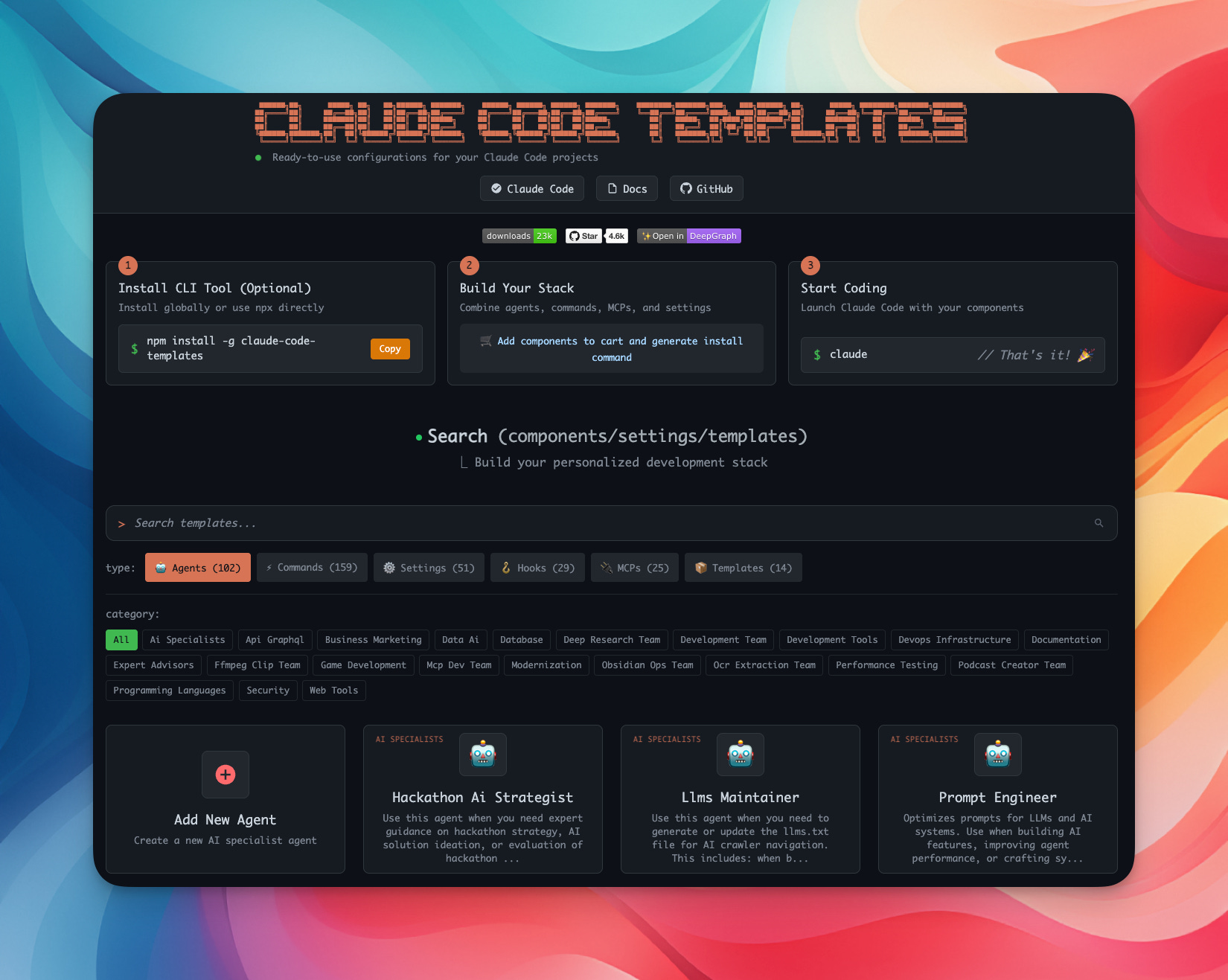
Trong này có rất nhiều resources hay ho về Claude Code cho các bạn tham khảo
Nếu bạn cảm thấy chưa đủ, à mà không, bạn NÊN check qua website/repo này, vì nó cực kỳ nhiều thứ hay ho!
—
ClaudeKit - Enhance Your Claude Code Workflows
Mình đóng gói tất cả những gì mình học được và cải thiện hàng ngày tại bộ ClaudeKit này, bạn chỉ cần cài đặt và sử dụng thôi.
—
Hết rồi!
Bây giờ mình sẽ tập trung vào bài thứ 6 - một chủ đề rất là HOT - mà mình nghĩ sẽ có nhiều bạn sẽ quan tâm:
“[VB-06] Vibe coding giao diện sao cho đẹp”
Hẹn gặp lại!